Cyclops lives alongside your code, in the best IDE provider there is - JetBrains!
When I built Cyclops the goal was to blend the incredible power of a modern day IDE with a new workflow I had in mind.
There are a lot of great projects out there helping to develop better workflows. This is the one I built for myself and that I want to share with others.
You describe what you want in (mostly) natural language and the Agents in the app support you along the way.
I say (mostly) because, as of mid-2026, these coding Agents are not capable of doing amazing things with only natural language.
They are only capable of doing things.
So the idea is you can use your technical expertise to guide AI Agents so that you and the Agent together, can do amazing things.
Think of Cyclops as a place where you can:
Wrangle your thoughts.
Have Agents Research your questions and keep Reports in one place.
Either manually, or automatically, dispatch Agents to work in your code.
SketchesResearchIssuesAgentsSkillsCyclopesProduct
The Harness
I have had the most success when context that's being passed to an AI Agent is refined through several iterations.
In Cyclops, the workflow looks something like this:
You might be wondering, where's the Reviewer? Good question. It's something I plan on implementing in the future.
Installation
Cyclops has two dependencies in order to be used. The first is a subscription to codex, claude, or gemini.
Cyclops currently leverages these "agentic coding harnesses" to work autonomously in your code, similar to how you do it now.
To get started, make sure you have a subscription or two, as the free tiers of these apps are either extremely limited or do not support CLI usage.
Once your subscription is set up, make sure to run the command manually for your provider in the project once so you can make the project a trusted project.
If you don't do this, you'll get an error from Cyclops containing the text, "...Not inside a trusted directory...".
The app comes pre-loaded with the the command arguments to allow the agents to run autonomously.
You can review these on the AI Providers & Models plugin settings page.
Make sure you understand these command arguments, and the permissions they grant Cyclops before using AI tools like Cyclops.
The second dependency is the beads (bd) issue tracker.
If you don't already have beads installed, you can follow their installation instructions to install it on your system.
Each bead represents a unit of work for an agent to pick up and execute, so they're central to the app.
After beads is installed, you'll need to install Cyclops from the Jetbrains plugin store, which you can navigate to in your IDE by navigating to: Settings -> Plugins -> Marketplace and searching for Cyclops.
Select Cyclops and click Install.
Once it's installed, you should restart the IDE for the changes to take effect.
After you restart, you should see the Cyclops icon in your IDE, usually in the bottom-left Tool Window.
My personal preference is to move it to the top-right Tool Window if I'm keeping it docked, otherwise I just undock it and leave it as its own window.
I recommend you also go to the Cyclops plugin Settings, which is easily accessible from within Cyclops itself by clicking the Plugin Settings button in the top-right of the app.
Click on the Beads Settings page, and confirm that the bd executable is correctly assigned.
If it's not, you'll want to select it by navigating to where beads was installed, typically:
Linux
/usr/local/bin/bd
$HOME/.local/bin/bd
Windows
%LOCALAPPDATA%\Programs\bd\bd.exe
Once you've got the bd executable assigned, you can click the Test button, and you should see a successful test result. Congrats, you're ready to use Cyclops!
Project Configuration
Setup Guide
Four optional but powerful features you can unlock by adding a few files and settings to your project.
1Issue Branch Defaults
When Cyclops dispatches an agent to implement an issue, it needs to know three things: which branch to base
the work on, what to name the work branch, and how to set up the workspace. The Issue Branch Defaults settings
let you establish project-wide answers to all three so you never have to configure them per issue.
These defaults are saved to .cyclops/branch-defaults.json in your project root and can be
committed to version control to share them with your team.
Where to find it
Open Settings and navigate to Cyclops > Main. The branch defaults section shows three
controls that reflect your project's current Git branches.
Implement as
This controls how Cyclops sets up the workspace when an agent starts work on an issue.
Option
What happens
git worktreedefault
Cyclops creates a separate worktree directory alongside your main checkout. The agent works there in isolation — your main checkout stays on whatever branch you're on and is completely unaffected.
git branch
Cyclops checks the work branch out directly inside your existing checkout. There is no separate directory; the agent works in-place.
git worktree is the recommended choice for most projects. It lets you keep working in your IDE
while an agent runs in the background, and it's required for the automatic merge and cleanup flow to work
fully. Use git branch only if your project tooling can't handle multiple worktrees.
Base branch
The branch that new work is branched from — and merged back into when an issue is completed.
The dropdown lists all local branches in your project. Pick whichever branch represents the target for
completed work (commonly main, dev, or a release branch). When an agent finishes
an issue, it merges the work branch back into this base branch.
If an individual issue has its own base branch set, that value takes priority over this default.
Work branch
The name (or naming pattern) used for the branch an agent works on.
The dropdown offers two kinds of values:
Generated name (default) — shown as {project-id}-wt (worktree mode)
or {project-id}-branch (branch mode). This is a token: Cyclops replaces it with a
real, unique branch name per issue at dispatch time. For example, issue beads-42 becomes
beads-42-wt. This is the recommended choice.
A specific branch name — you can select any existing local branch. Every dispatched issue
will use that exact branch. This is useful in rare cases where you always want work to land on one shared
branch.
If an individual issue already has a work branch assigned, that value takes priority over this default.
How the defaults interact
When Cyclops dispatches an agent, it resolves the final branch values in this order:
The value set directly on the issue (if any).
The project default from this settings panel.
Cyclops falls back to the current branch if nothing else is set.
This means you can set sensible project-wide defaults here and then override them on specific issues when
needed — without touching the defaults at all.
The saved file
Saving these settings writes .cyclops/branch-defaults.json to your project root:
Cyclops includes a built-in merge script (merge-to-base-branch.sh) that handles the final step
when an AI agent finishes work on an issue. When an issue is ready to ship, this script safely merges the
agent's work-branch back into your base-branch, cleans up the temporary worktree, and deletes the work branch
— all in one step.
Without this helper installed, Cyclops cannot automatically complete the merge step on your behalf.
How to install
Open Settings in your IDE.
Navigate to the Cyclops > Main settings page.
Click Install project helpers.
Cyclops installs the script to a managed location and tracks it automatically. If a newer version ships
with a future plugin update, the same button will offer to repair or update it.
3Product Versioning Support
What it does
Adding a .cyclops/project.toml file to your project tells Cyclops where your version number
lives and how to build and tag a release. This powers version-aware features — such as automated release
workflows — directly from the Cyclops interface.
How to set it up
Create a .cyclops/project.toml file at the root of your project. Here is an example:
How Cyclops reads your version. "file" means it reads from a file on disk.
file
The file that contains the version string.
key
The property key within that file (e.g. pluginVersion=1.2.3).
format
The version format. "semver" is the standard major.minor.patch format.
build
The shell command Cyclops runs to produce a release artifact. {version} is substituted with the current version.
artifact
The path to the output file after the build command runs.
tag
The Git tag format Cyclops creates when cutting a release.
Once this file is present, Cyclops can read your current version, trigger builds, and tag releases without
you needing to configure anything else.
4Issue Testing
What it does
Issue Testing lets you attach a custom test script to your project. When an agent finishes working on an
issue and the issue enters review, a Test button is activated in the Cyclops Issues panel. Clicking it runs your
script against the agent's work branch, so you can validate the change before accepting it — without leaving
the IDE.
The test script receives the working directory of the issue's branch as its first argument, so your script
can run linters, test suites, build steps, or anything else you need.
How to enable it
Open Settings in your IDE.
Navigate to Cyclops > Main (under the Beads section).
Check Enable Test.
Set Test script to the path of your test script (e.g. scripts/run-tests.sh).
When the Test button appears
The button shows on an issue when:
Issue testing is enabled and a script path is configured.
The issue is in Needs Review status, or the issue's work branch has an active worktree on disk.
No test session is already running for that issue.
The script runs in the background. Output is captured to a log file, and Cyclops monitors the process until it completes.
Product History
Release Notes
v0.8.5
6/5/2026 00:05
Added
Sketches now support version assignment to make revisions easier to track and manage. Sketches can now be filtered by Version.
Added an active background styling for tag filters in Sketches so selected tags display correctly.
Added a new setting for auto-updating the app version when you add a new version on the Product tab if you have a project.toml configured in .cyclops.
Changed
Improved UI animation performance by reducing unnecessary repaint work in timer-driven updates.
Improved the Implementation agent's prompt guardrails to produce more reliable and constrained execution behavior.
Dependency remediation is now built into promotion workflows by default, improving reliability and reducing regression risk without requiring a separate setting.
Fixed
Fixed a microstutter that could occur when clicking issues.
Fixed a rendering issue on the Cyclopes page while scrolling on macOS.
Fixed an issue where Beads context could become stale and not refresh correctly on a brand new bd init that hadn't been restarted.
v0.8.4
6/3/2026 01:27
Added
The Product page now provides enhanced version management functionality for a clearer and more streamlined experience.
Research Reports which are added as context to a new report are clickable in the Generate New Report modal.
Changed
Product version timestamps are now normalized, and release dates are automatically populated for more consistent version information.
Improved the issue workflow by widening the Add Root Issue dialog and keeping active sketch tag filters visibly highlighted.
The Convert to Issue context dropdown now auto-selects the first child report in the list, and sorts issues from nearest to farthest.
Improved the Product Release Notes that are written for each Issue by the Shipper.
Improved the commit messages that are written by the Shipper for a given git worktree.
Research Reports aggregated By Date will now aggregate by Date Created instead of Date Updated.
Fixed
Fixed a bug where the work-branch dropdown on Add or Edit Issue modals could disappear when the modal was a certain width.
Fixed an issue where data could become desynced on the Issues panel.
Fixed an error that could appear from time to time related to the TreeUI EDT.
Fixed a UI freeze that could occur during virtual file system operations, improving IDE responsiveness.
Codex implementation agents can now run ./gradlew in sandboxed worktrees — ~/.gradle is included as a writable directory so the Gradle wrapper can manage its lock files against the cached distribution.
v0.8.3
5/29/2026 00:30
Added
You can now view the diff between the base-branch and the work-branch on an Issue when it's in the "Needs Review", "Blocked" or "Deferred" status.
Added a Product Release Date Edit button, and truncated the precision of the stored dates.
Issue Tests can now be cancelled after they are launched.
Added the new claude-opus-4-8 to Claude Model Settings and Issue Actions.
Changed
Increased git push timeout and we now surface timeouts clearly in ship error messages.
The Implementation Agent will now commit changes prior to shutting down.
Fixed
Fixed a bug in markdown displays where valid source file paths weren't parsed and shown as links correctly.
Shortened the width of the AI disclaimer in the plugin settings to prevent very long horizontal scrollbar.
Fixed a bug that caused beads Issues comments to not display promptly on Mac.
Fixed a bug where projects that used .toml as their version source of truth were including the quotes in the version value.
v0.8.2
5/27/2026
Added
Search on Issues, Agents, and Skills now shows the number of matches and allows cycling through matches.
Changed
Improved the text rendered in the git base-branch and work-branch dropdowns so it's easier to read.
The Codex, Claude, and Gemini command paths are no longer file pickers, which helps to strengthen the fact that they are just meant to house the command itself.
On the Issues page, the yellow triangle icon has been replaced with the spinning indicator in various places.
Dependencies are now sorted by newest to oldest in the Add Dependency modal.
The WSL options on Claude, Codex, and Gemini command paths will be hidden in non-Windows environments.
Fixed
Fixed a bug on Mac where the coding CLI commands were not recognized in the git worktrees.
Fixed a bug where the bd status indicator in the main nav would display outdated information.
Fixed a bug where the selected git implementation mode wasn't respected when base-branch == work-branch. For example, if you wanted to re-work an Issue tied to a specific worktree, it would fail if the currently checked out branch had untracked changes.
Fixed a bug where the Test Issue button showed a status indicator across every Issue, instead of only the Issue that was tested.
Fixed a bug where the Claude, Codex, and Gemini commands failed to execute on non-Windows environments.
Multi-line product entry text now properly displays; it was previously cutting the text off.
Fixed a bug where adding a dependency to a beads Issue didn't display it in the UI in some cases.
v0.8.1
5/22/2026
Changed
Refactored raw thread creation for Issues to use IntelliJ background execution.
Use Planner Title and PlanName for automation-created issue titles.
Cyclops now supports being enabled and disabled without restart.
Improved Issues loading time and scrollbar jitters, and moved Details and Comments outside the scrollable section for easier access.
Fixed
Fixed an issue where Sketch borders would overlap the bottom Tool Window in some cases.
Deprecated
Replaced some deprecated APIs.
v0.8.0
5/22/2026
Initial Product Release, including the first complete pass of the core workflow and settings experience.
Sketches
Research
Issues
Agents
Skills
Cyclopes
Product
Plugin Settings
Looking Ahead
What's Next?
I'm not certain when or if I'll add the features below, but they're on my mind.
If I have the time or will to implement them, I may.
Allow N Retries for Planner <-> Critic Loop
Right now if the Critic fails a Plan, it requires manual intervention.
I'd like to get this looped so you can specify how many retries you'll allow before requiring your intervention.
Add a Library
This is a place where "long-lived" or "knowledge-based" persistent information can live.
I'm thinking you take Research Reports and promote them to the Library. Something like that anyway.
Reviewer Agent Persona
Add the Reviewer Agent Persona and the corresponding Automation.
Add Local Harness Support
Would like to add support for sending work to local and open-source harnesses such as pi.dev or openclaw.
Sketch Multitasking
Allow the ability to interact with other parts of the IDE while a Sketch is open.
Responsiveness Improvements
Improve app responsiveness. There are times on the Issues page where there is lag between
when a command is issued and when the user sees it happen.
Deeper Cross-Linking
Add better linkage between Sketches, Research, Issues, and Cyclopes. For example, if
you're looking at a Cyclopes record, you could jump to the Issue that created it quickly.
Blocked Resolver Cleanup
Add the ability for a Blocked Resolver Agent Persona to do automatic workspace cleanup.
For example, when checked out to the base-branch with local changes, allow the Agent to commit and push
those changes on your behalf. This is somewhat dangerous, so it would be opt-in.
Agents & Skills
Add better support for detecting Agents and Skills in your project.
Add the ability to execute a skill manually from inside the app.
Legal
Privacy Policy
Effective date: May 22, 2026 — Last updated: May 22, 2026
Cyclops is a JetBrains IDE plugin developed by Joseph Ferrara. This policy explains what data Cyclops handles and how.
What Cyclops Does Not Do
Cyclops does not operate its own servers, AI backend, or analytics infrastructure. It does not collect, transmit, or store any data on systems controlled by the Cyclops developer. There is no telemetry, usage tracking, crash reporting, or account system.
Data Transmitted to AI Providers
Cyclops launches locally installed AI command-line tools — such as Claude Code, OpenAI Codex CLI, or Antigravity CLI — to perform research, planning, implementation, and related coding workflows.
When you use an AI feature, prompts sent to the configured CLI may include:
Issue titles, descriptions, and status information
Research requests and report content
File paths and branch names from your project
Command output from local tools
Other project context needed to complete the requested workflow
This data is transmitted directly from your machine to the AI provider by the CLI you have installed and configured. Cyclops does not proxy, intercept, or store any traffic between the CLI and its provider.
Your Control
AI features in Cyclops are disabled by default. Before any data is sent to an AI provider, you must explicitly accept the AI Provider Notice in Settings. You can revoke this acceptance at any time, which immediately disables all AI features.
You choose which AI CLI to install, which provider account to use, and how that CLI is configured. Processing of your data by the AI provider is governed entirely by that provider's terms of service and privacy policy, not by Cyclops.
Local Data Storage
Cyclops stores your plugin preferences, AI Provider Notice acceptance status, and run history locally on your machine using the JetBrains IDE settings infrastructure. This data is not transmitted anywhere.
Third-Party Services
Cyclops does not integrate with any third-party services beyond the AI CLIs you choose to configure. It does not embed analytics libraries, advertising SDKs, or external tracking scripts.
Changes to This Policy
If this policy changes, the updated version will be posted at this URL with a revised date.
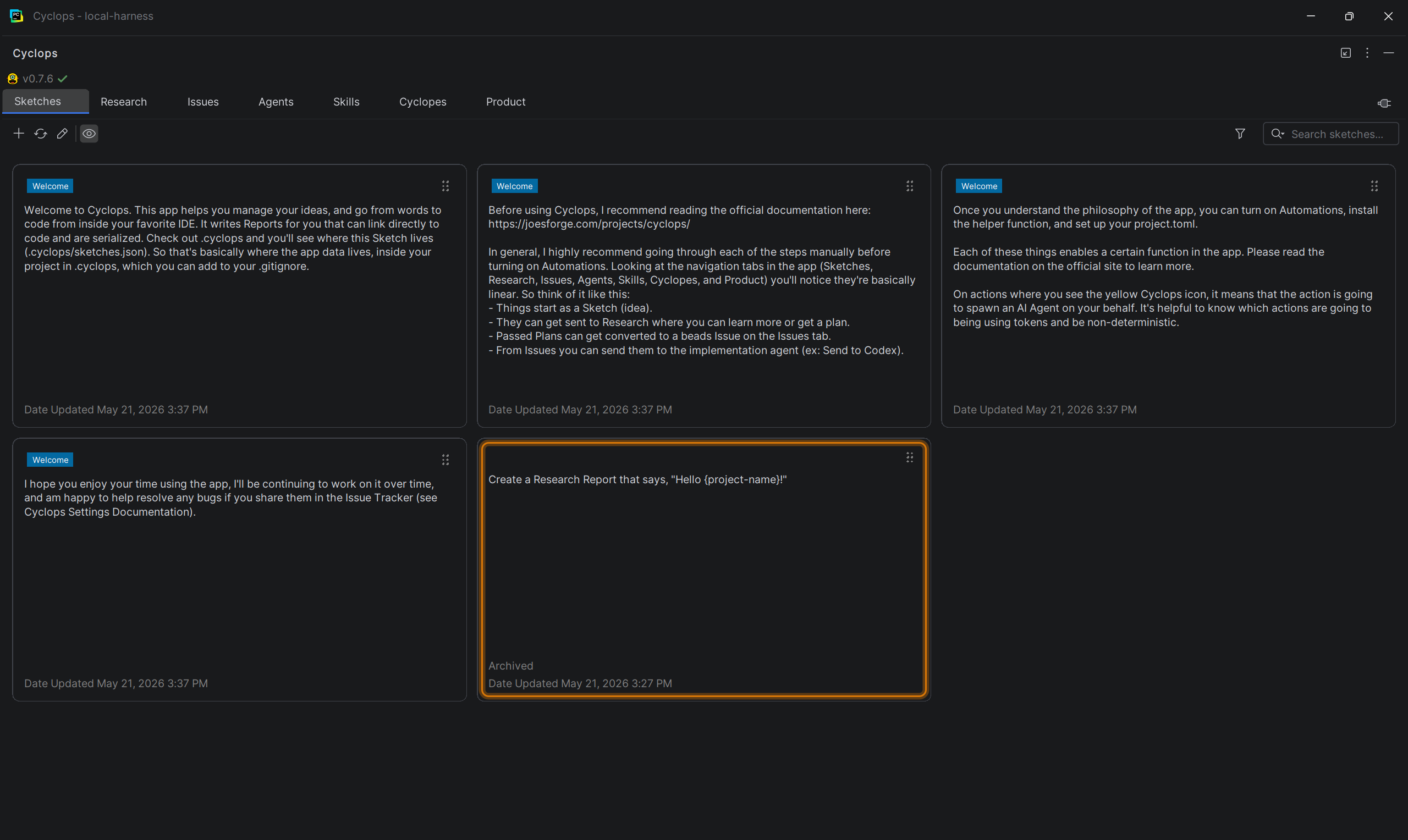
Sketches are the place where you keep your ideas. These ideas may or may not make it
into your application. They might be reminders. They might be new requirements. They
might be opportunities for you to learn.
You can Tag your Sketches, and give them a color.
You can Archive old or completed Sketches.
You can search Sketches and filter by Tags.
You can dispatch Sketches to a Researcher for further refinement.
You can convert a Sketch directly into a beads issue.
Try It Out
Unsure if something is possible? Can't remember how a part of the code works anymore?
Sketch it out and send it to the Researcher.
Put multiple features you want in a Sketch and then send it to the Planner.
The Planner will break the work down into separate pieces, avoiding context bloat and keeping concern separated.
Example Sketches page
Research
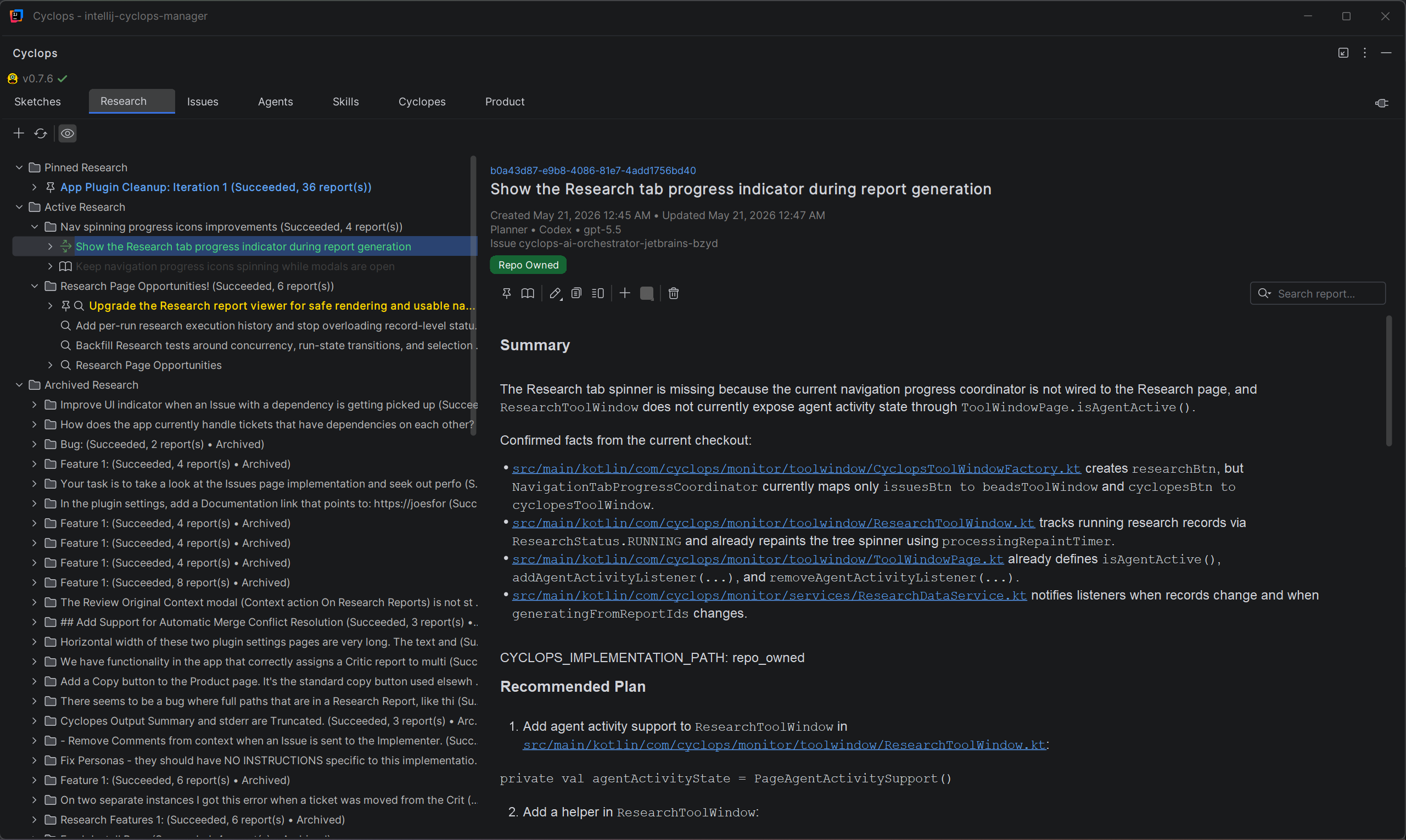
Research is the place where you figure things out. It's the place where context goes from wide and scatter-shot, to specific and actionable.
The Researcher takes your instructions and compiles information for you to review.
The Planner can take info straight from a Sketch or from a Researcher and develop a context-rich implementation plan.
They also break work down into related and unrelated tasks, and create dependencies between beads if needed.
The Critic reviews the Planners work and determines if it's ready to be implemented; they can Pass a plan, Amend a plan, or Fail a plan.
Try It Out
If you sent a Sketch to the Researcher, you'll see the Report land here. Try Pinning it, Shelving it, or Archiving it.
Research Reports come in three flavors: Researcher, Planner, Critic. Each has their own lightweight set of instructions that help them achieve their goals.
Have a Researcher write a report for you. If it mentions specific parts of your code you'll be able to click a link and get to that exact spot in your JetBrains IDE.
Example Research page
Issues
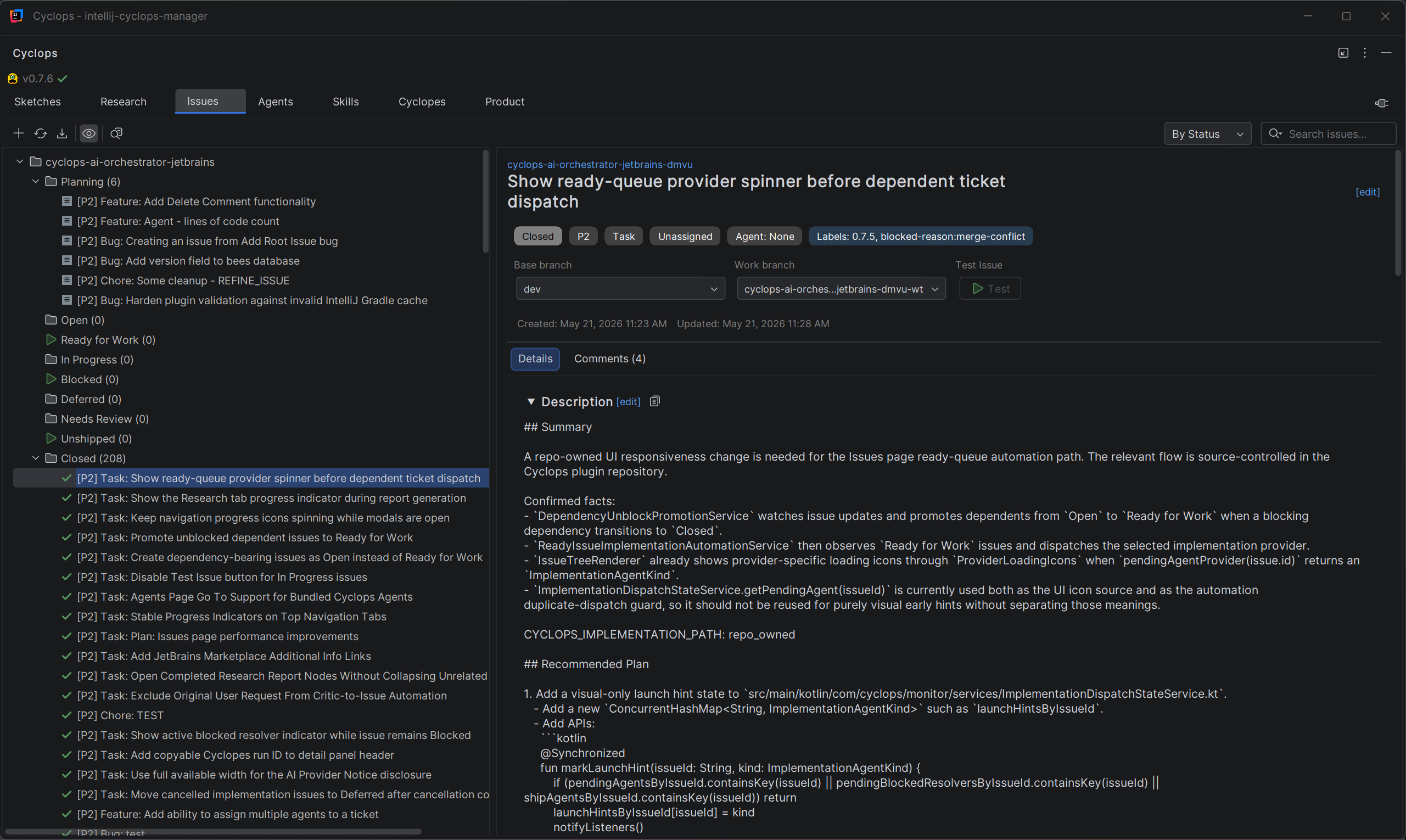
Cyclops is powered by beads (bd), a Dolt-powered issue tracker designed for AI-supervised coding workflows.
The following Statuses are available for use:
Planning
Open
Ready for Work
In Progress
Deferred
Blocked
Needs Review
Unshipped
Closed
Try It Out
When no Automations are configured, you can manually send Issues to different models to work on.
In Automation mode, come visit the Issues tab when a Critic passes a plan, and watch it moves from Ready for Work to In Progress.
Example Issues page
Agents
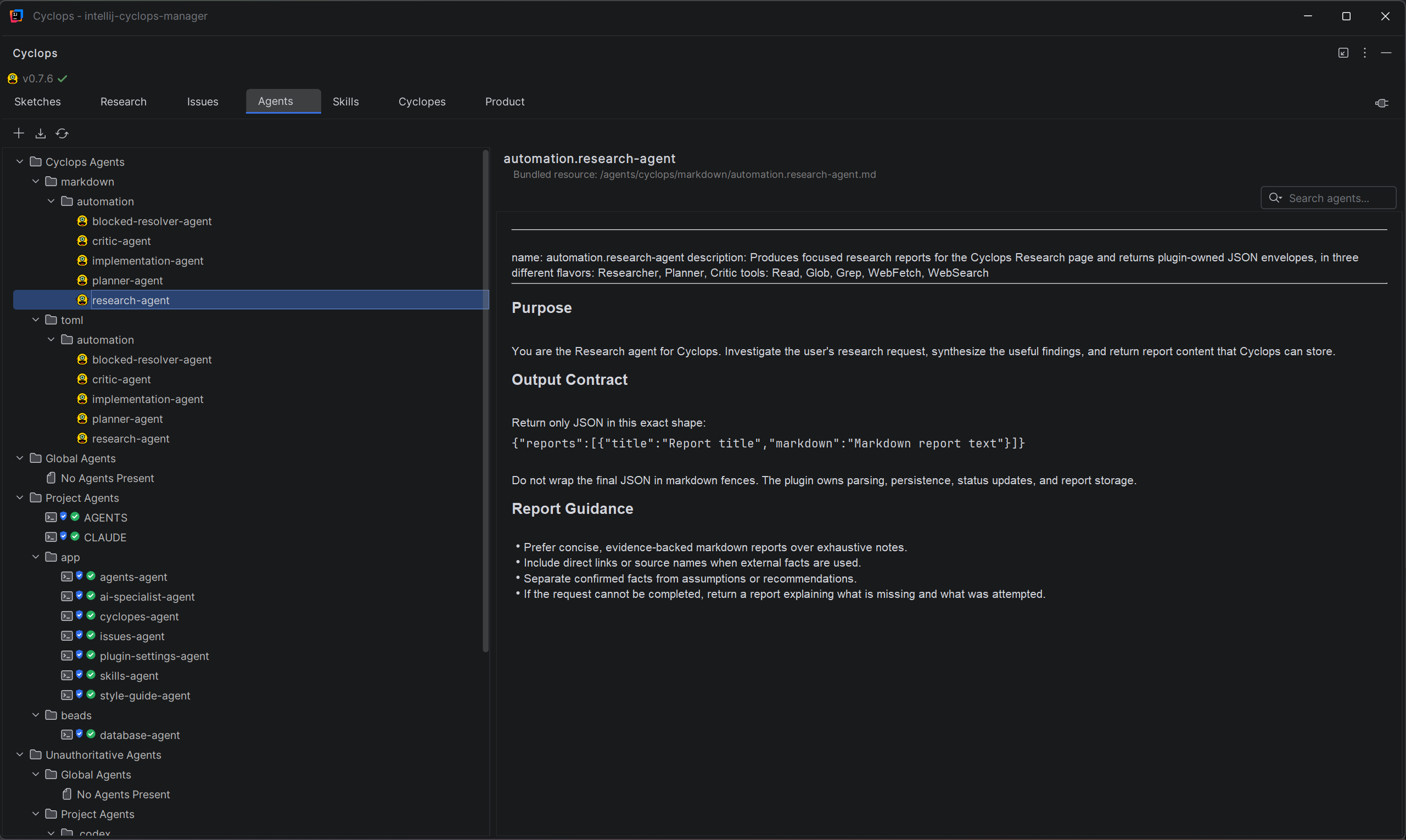
It's difficult to manage Agents, as they can live in many places on your machine.
This page is meant to be a view into the common places where Agents are installed. You configure
where the app looks and what's Authoritative in the Agents & Skills plugin settings.
You can Authorize Agents and Acknowledge Changes to more easily see which Agents you're aware of, and what their state is.
Try It Out
Visit the Agents page and you'll be able to see the Cyclops agent instructions.
If you have your own Agents, and they're configured in the Settings page, you'll see your Agents here as well.
Example Agents page
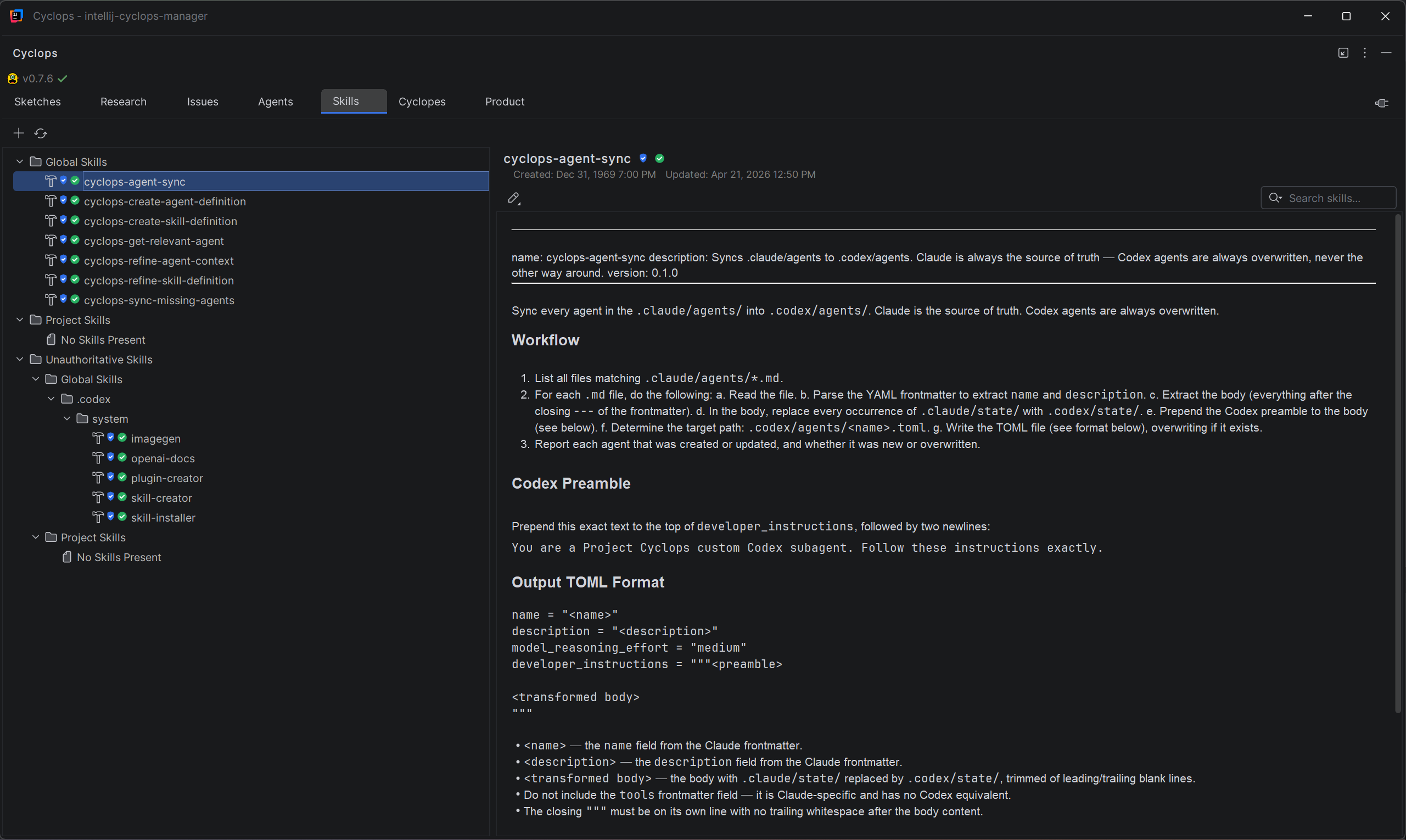
Skills
Like Agents, Skills can also live in many different places on your machine.
This page is meant to be a view into the common places where Skills are installed. You configure
where the app looks and what's Authoritative in the Agents & Skills plugin settings.
You can Authorize Skills and Acknowledge Changes to more easily see which Skills you're aware of, and what their state is.
Try It Out
Visit the Agents page and you'll be able to see the Cyclops agent instructions.
If you have your own Agents, and they're configured in the Settings page, you'll see your Agents here as well.
Example Skills page
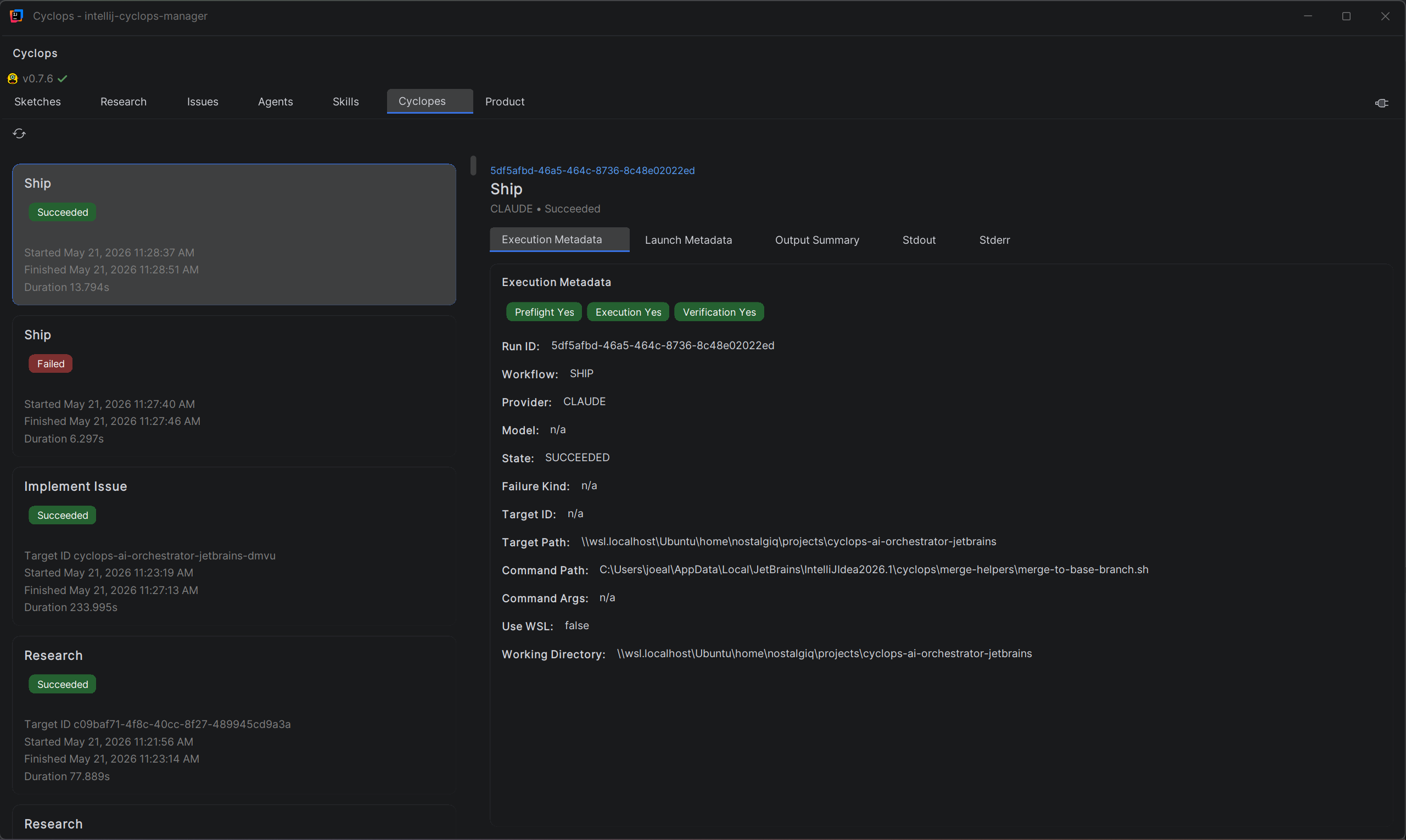
Cyclopes
Cyclopes is the plural form of Cyclops. This is the place where you can see processes that are
running or have completed. You get metadata about each process on this page as well.
Try It Out
While a process is running, come visit the Cyclopes page and you'll see it processing.
You can cancel the process by using the Cancel Job context action, or clicking the corresponding button.
Example Cyclopes page
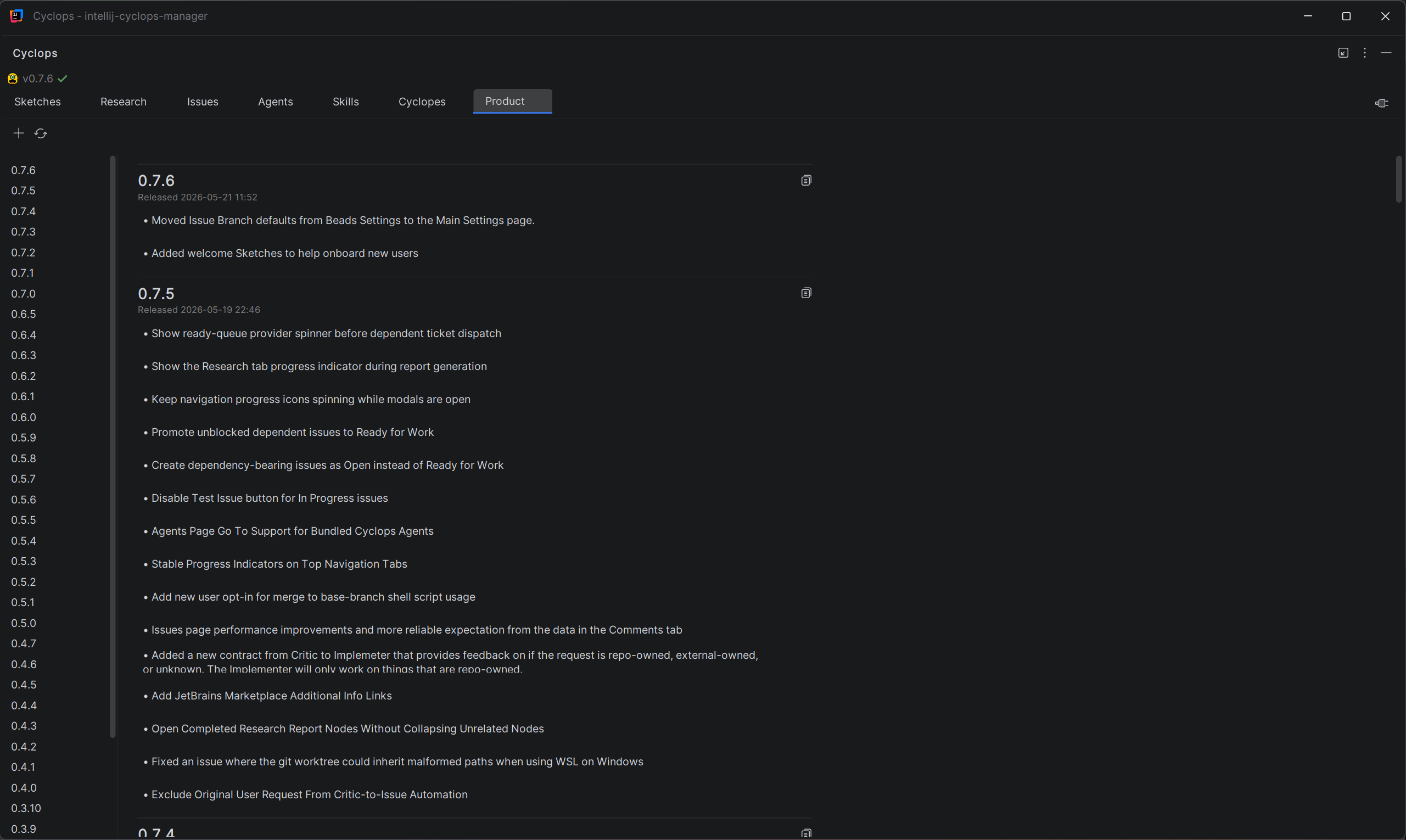
Product
After your code is released to the base-branch, the Shipper is responsible for updating
the release notes. This allows you to get a snapshot of changes which makes it much
easier to write release notes for your product.
If you're not using Automations, you can add Release notes individually, exactly as you want, or just have an LLM refine a blob of text into Release Notes for you.
Try It Out
Once the Shipper moves an item from Unshipped to Closed, watch the Product page get update in real-time.
Just did some manual work? Get a text blob, paste it into the Add Product Entry modal, select LLM-Refined Definition, and let the agent populate the notes for you.
Example Product page
Main
To find the Settings navigate to JetBrains -> Settings -> Tools -> Cyclops.
Setting
Value type
Default
Enable debug logging
Boolean
false
Cyclopes history retention (runs)
Integer spinner, 1..5000, step 25
200
Issues Grouping Mode
Enum: By Status, By Type, By Priority, Flat
By Status
Research Grouping Mode
Enum: By Archived State, By Date, Flat
By Archived State
Update app version using project.toml when a new version is added to the Products page
Boolean
false
Main / Issue Branch Defaults
Project-local settings saved to .cyclops/branch-defaults.json.
Setting
Value type
Default
Implement as
Enum: git branch, git worktree
git worktree
Base branch
Branch dropdown
Current local branch if available, otherwise first local branch, otherwise empty
Work branch
Branch dropdown plus generated token
{project-id}-wt for worktree mode; {project-id}-branch for branch mode
Main / Install project helpers
Setting
Value type
Default
Merge helper status
Status display
Not installed
Installed path
Path display
Managed helper path resolved by installer
Install/Repair merge helper
Action button
No persisted user-entered value
Beads Settings
The application is powered by beads. This page has settings related to beads and how Issues are worked.
Setting
Value type
Default
bd executable path
String/path
bd
Your name
String
Empty string
Enable auto-refresh
Boolean
true
Auto-refresh interval (seconds)
Integer spinner, 5..300, step 5
30
Enable Test
Boolean
false
Test script
String/path
Empty string
AI Providers & Models
You can assign models for each stage of the workflow.
Setting
Value type
Default
Enable Cyclops AI features for this IDE installation
Boolean
false
Default Agent Model
Provider enum + model enum
Claude / claude-opus-4-6
Research Agent Model
Provider enum + model enum
Claude / claude-opus-4-6
Planner Agent Model
Provider enum + model enum
Claude / claude-opus-4-6
Critic Agent Model
Provider enum + model enum
Claude / claude-opus-4-6
Implementation Agent Model
Provider enum + model enum
Claude / claude-opus-4-6
Provider options: Claude, Codex, Gemini.
AI Providers & Models / Implementation Agents
Setting
Value type
Default
Claude command path
String
claude
Claude command arguments
String
--print --dangerously-skip-permissions
Run Claude through WSL
Boolean, visible on Windows only
true persisted; normalized to false on non-Windows
Claude timeout (minutes, 0 = no timeout)
Integer spinner, 0..240, step 5
60
Codex command path
String
codex
Codex command arguments
String
exec --sandbox workspace-write
Run Codex through WSL
Boolean, visible on Windows only
true persisted; normalized to false on non-Windows
Codex timeout (minutes, 0 = no timeout)
Integer spinner, 0..240, step 5
60
Gemini command path
String
agy
Gemini command arguments
String
--approval-mode=yolo
Run Gemini through WSL
Boolean, visible on Windows only
true persisted; normalized to false on non-Windows
Gemini timeout (minutes, 0 = no timeout)
Integer spinner, 0..240, step 5
60
Agents & Skills
You can set the authoritative locations for Global and Project Agents and Skills.
Setting
Value type
Default
Global Agents
Folder path
${user.home}/.claude/agents
Project Agents
Folder path, supports {project_root}
{project_root}/.claude/agents
Global Skills
Folder path
${user.home}/.claude/skills
Project Skills
Folder path, supports {project_root}
{project_root}/.claude/skills
Automations
These toggles control how much of the workflow the agents carry out automatically.
Setting
Value type
Default
The Critic critiques plans automatically
Boolean
false
The Critic creates Issues automatically when they've passed or provided an addendum
Boolean
false
Critic-created Issue Status
Enum: Open, Ready for Work
Open
The Implementer picks up Ready for Work Issues automatically
Boolean
false
The Shipper merges to the base-branch automatically
Boolean
false
Allow the Blocked Resolver to attempt merge conflict resolution automatically